Craftica
Dune - Texture Deskmat
Dune - Texture Deskmat
Couldn't load pickup availability
The Lore: The Shifting Frontier
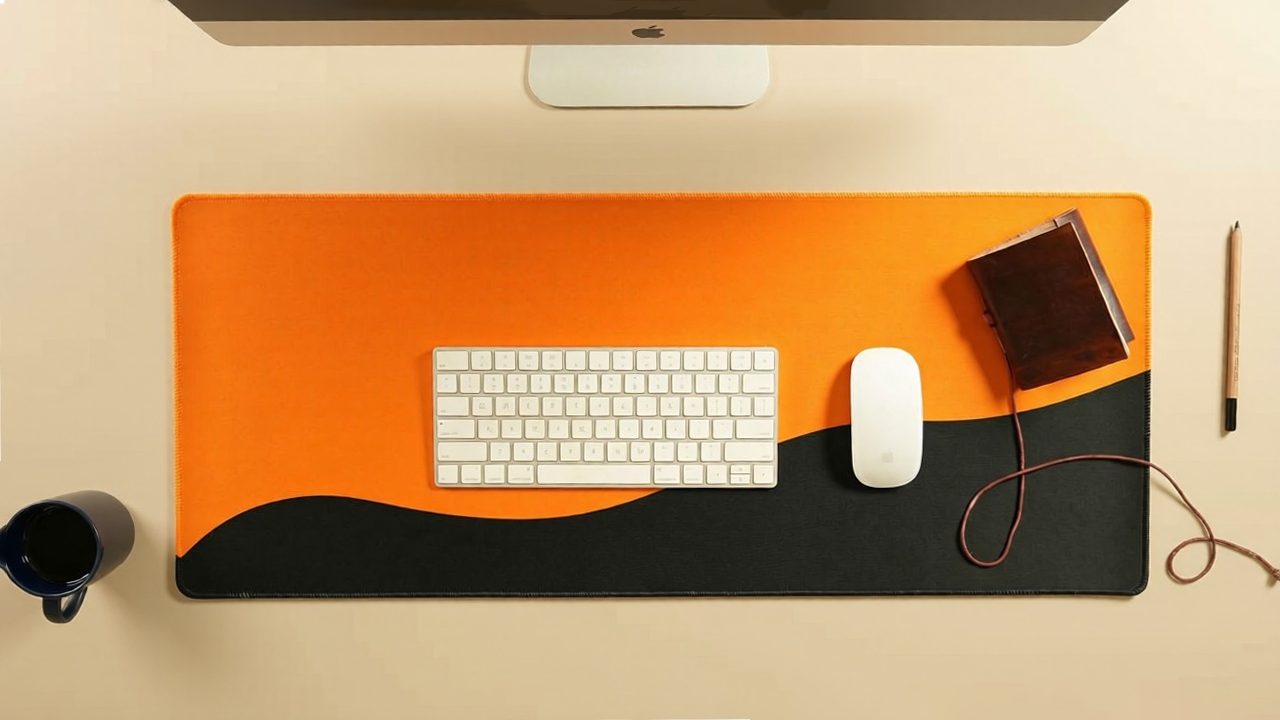
In the world of the Syndicate, nothing is static. Dune represents the "Constant Evolution" of a builder’s landscape. It is the visual boundary between the known and the unknown. The obsidian ground represents the solid foundation of your current systems, while the orange horizon represents the heat of the next big move. To work on this mat is to stand at the edge of your own empire, recognizing that the sands are always shifting and the only way to stay ahead is to ride the wave of the "Dune." It is a reminder that the most fertile ideas often grow in the harshest environments.
The Symbolism: The Edge of Action
Dune represents the psychological state of Threshold Focus.
- The Sinuous Wave: Symbolizes Fluid Momentum. Unlike a jagged line, the curve suggests a smooth transition between states of mind. It represents the ability to move from "Planning" (the black) to "Execution" (the orange) without friction.
- The Solar Orange: Symbolizes Vitality and Risk. It is the color of the "Hustle"—the high-energy output required to push a project across the finish line.
- The Obsidian Base: Symbolizes Absolute Authority. It provides a "Heavy" visual anchor for your tools, ensuring that while your ideas are bright and expansive, your workflow remains grounded.
Aesthetic Engineering: The Horizon Anchor
- The "Low-Horizon" Crop: By keeping the black section in the lower third, the design acts as a natural "Shadow Box" for your keyboard and mouse. Your peripherals sit in the dark zone, making them less of a visual distraction, while the orange top "glows" in your peripheral vision.
- Dynamic Negative Space: This design uses large blocks of solid color to reduce Visual Cognitive Load. It is the ultimate "Focus Mat" because there are no intricate details to catch the eye, allowing the brain to devote all resources to the screen.
- Workspace Vibe: Perfect for the "Stealth" setup with a pop of color. It pairs incredibly well with matte-black peripherals, wooden desk surfaces, and orange-backlit mechanical keyboards.
Technical Specifications
Dimensions & Sizing
- Form Factor: Extended XL / Deskmat
- Width x Length: 800 mm x 330 mm
- Imperial Dimensions: 31.5" x 13.0"
- Thickness: 3.0 mm (Optimized low-profile cushioning)
Material & Build
- Surface Material: Premium, high-density micro-woven cloth
- Tracking Optimization: Performance-tuned for pixel-precise optical and laser mouse sensors
- Edge Construction: Anti-fray, low-profile seamless stitched edges for enhanced durability
- Base Material: Heavy-duty, textured anti-slip natural rubber grip
Performance & Ergonomics
- Glide Characteristics: Balanced surface friction engineered for both high-speed tracking and stopping power (Control & Speed hybrid)
- Setup Stability: High-friction backing eliminates unwanted movement during intense use
- Comfort Profile: 3mm density provides ergonomic wrist support while maintaining a flat, stable surface for desktop peripherals
Care & Maintenance
Keep your deskmat clean using simple, high-yield care steps:
- Daily Refresh: Wipe down with a damp, lint-free microfiber cloth to remove dust and surface oils.
- Spot Cleaning: For stubborn marks, gently rub with a soft sponge, warm water, and a drop of mild soap. Avoid harsh scrubbing.
- Drying: Always lay completely flat to air dry in a well-ventilated space.
The "Never" List
- Do NOT Machine Wash: Heavy agitation degrades the rubber base and peels the stitched edge adhesive.
- Do NOT Apply Heat: Keep away from tumble dryers and irons to prevent warping.
- Do NOT Bleach: Avoid harsh chemical solvents to keep your print colors crisp and vivid.